TIPS FOR TUNE-UP AND OPTIMIZE YOUR PC FOR FREE
UNNECESSARY SOFTWARE
Stores like Best
Buy call this stuff “unnecessary software,” but the rest of us call it
bloatware. It can dramatically slow down a new PC and computer manufacturers
are paid to include it. To get rid of bloatware on a new PC, you can try PC Decrapifier (https://www.pcdecrapifier.com/download), which will
automatically remove known bloatware.
This program
doesn’t know about all bloatware, however — you’ll probably have to go into the
Uninstall a program pane in the Windows Control Panel and uninstall the
software you don’t want yourself. If you’re unsure about whether a program is
bloatware or whether it’s useful, try Googling its name before uninstalling it.
A Consumerist
investigation from 2010 showed that Best Buy doesn’t actually remove this
stuff, anyway. They just delete the desktop shortcuts to it, making the PC look
a bit less cluttered but run no differently. Whether you pay Best Buy or not,
you’ll apparently have to remove this stuff yourself — so you might as well
save the money.
WINDOWS UPDATES (FREQUENTLY)
Yes, Best Buy
will update Windows for you, just as they’ll charge you a fee to install the
latest software updates for an Xbox or PlayStation console. Both of these
options are silly — like consoles, Windows is built so average users can
install updates without the help of professionals. Modern versions of Windows
are even set to install updates automatically out of the box, so you may not
even have to do any of this updating work on your own.
You can view your
Windows Update settings and manually perform updates from the Windows Update
pane under System and Security in the Control Panel.
FREE SPACE
If you’ve been
using your computer for a while, you can probably free up disk space by running
the excellent (and free) CCleaner utility. It will scan your computer for
temporary files and other unnecessary system files you can delete, then delete
them and free up space. If you really want to use a registry cleaner — and we
don’t recommend it because it won’t help you at all — you can use the registry
cleaner built into CCleaner.
You don’t need a
PC cleaning program — CCleaner is all you need. If you don’t want to install
CCleaner, you can instead use the Disk Cleanup tool built into Windows.
OPTIMIZE STARTUP
Best Buy promises
to optimize your startup process, but you can do this yourself. On Windows 8,
open the Task Manager (right-click the task bar and select Start Task Manager),
and click over to the Startup tab. From here, you can manage your startup
programs without installing any other software.
If you’re using
an earlier version of Windows, you can use the MSConfig application to control
your startup programs or use the startup program manager built into CCleaner.
ANTIVIRUS SCHEDULES
If you’re using
Windows 7, 8 or 10, you already have Windows Defender installed. If you’re
using an older version of Windows, you can get the same protection by
installing Microsoft’s free Microsoft Security Essentials. If you don’t want to
use Microsoft’s antivirus programs for some reason, there are tons of free
solutions for AV’s and of course, read my section about viruses.
If you’re already
running an antivirus and wish you could get a second opinion from another
antivirus program, follow these instructions to safely perform a scan with a
second antivirus program. You should never have two antivirus programs
installed and running in the background at the same time, as they can interfere
with each other.
DEFRAGMENT YOUR COMPUTER
If you’re using a
solid-state drive, you can skip the defragmenting entirely. If you’re using an “older
mechanical drive”, you probably don’t have to worry about it because Windows
runs defragmentation operations automatically on a schedule. If you want to
defragment your hard drive on your own, just open the Disk Defragmenter tool
and click the button to run a defragmentation operation.
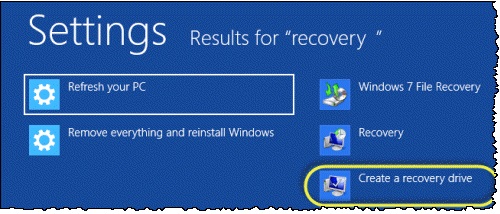
CREATE RESTORE DISCS
You can create
restore CDs to easily restore your computer back to its factory default state
if its software ever becomes damaged, and stores like Best Buy may charge you
to do this for you on new PCs. This isn’t necessary much of the time, as
computers ship with recovery partitions and Windows 8 includes built-in refresh
and reset options.
However, on
Windows 7, you can likely create restore CDs or DVDs using a tool your
manufacturer provides. On Windows 8 or 10, you can create a recovery drive that
contains a copy of your entire system, just in case the recovery data on your
hard drive becomes damaged for some reason.
RESTORE YOUR PC TO FACTORY DEFAULTS
One of the
biggest tricks up a computer technician’s toolkit is the restoring a computer
to its default settings or reinstalling Windows. This will fix whatever is
wrong with a computer’s software and put its software in a literally “like new”
state. In the past, average people have been put off from reinstalling Windows
by the scary-looking text mode installation screens that appear at the start.
However, this is now much easier.
On Windows 8 or
10, you can run a refresh or reset your PC to quickly get your its software
back to its factory-default state.
On Windows 7, you
can reinstall your operating system from your manufacturer’s recovery
partition.
On either version
of Windows, you can reinstall Windows entirely from a Windows disc you have
laying around.
If you’re having
computer problems and just can’t seem to solve them or you just want to wipe
everything out and start fresh, this is the thing to do.